
How to Read Your Dental Aging Report (and What to Check First)

An aging report is much easier to work once you know which few lines to check first.
What a dental aging report shows
Most practice software can run two aging reports, one for insurance claims and one for patient balances. Both sort money by age, but each needs a different kind of follow-up, so read them separately. This post is about the insurance aging report.
On an insurance aging report, each line is usually one claim. You'll typically see the patient, the insurance plan, the date of service, the date the claim was sent, the amount, and how many days it's been open. Many reports also show the last note or the claim status.
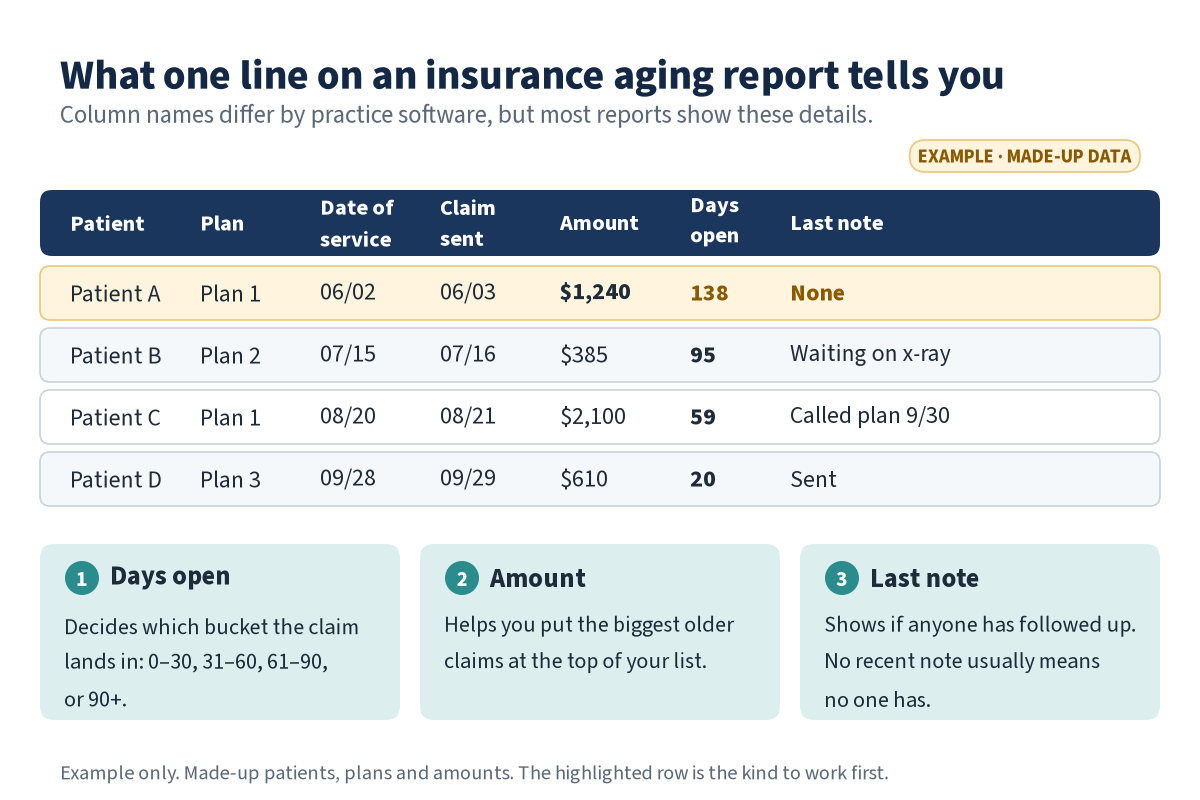
Example only, with made-up data. Each line on an insurance aging report is one claim. The days open, the amount, and the last note tell you which claims to work first.
The four aging buckets in plain terms
0–30 days: This is normal. Most claims sit here while the plan processes them. Just make sure each one actually went out and the plan received it.
31–60 days: Worth a look. A claim here may be waiting on an x-ray, a narrative, or other information the plan asked for.
61–90 days: Time to follow up. Call the plan or check its portal, and find out exactly what's holding the claim.
90+ days: Your top priority. These claims may be getting close to the plan's filing or appeal deadline, and every plan's deadline is different. Some can still be collected, and some will need a decision from your office.
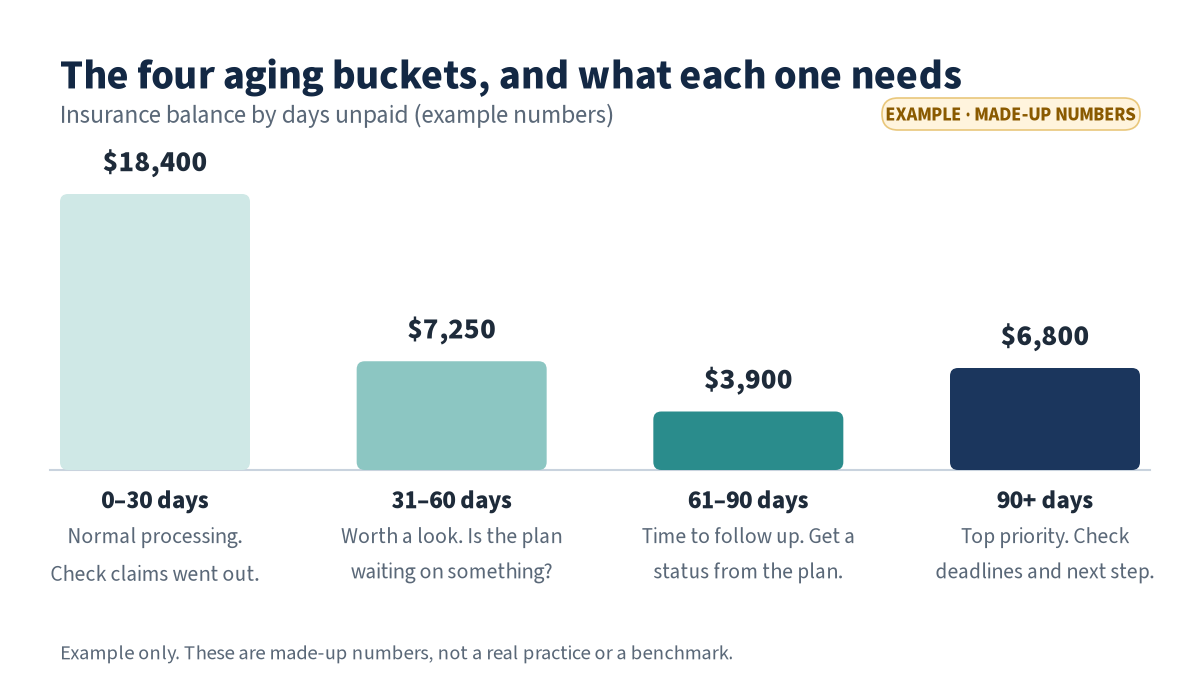
Example only, with made-up numbers. What matters most is whether the 61–90 and 90+ columns grow from month to month.
Don't judge the report by its total alone. A big 0–30 column may just mean you had a busy month. A 61–90 or 90+ column that keeps growing month after month is the real signal to act.
What to check first: five quick steps
Check the report settings. Confirm the date and any provider or location filters, and make sure the report shows insurance balances only. The wrong filter can hide claims or mix in patient balances.
Look at the 90+ bucket. Note how many claims are there and what they add up to. If you have last month's report, compare the two. Is the 90+ column growing or shrinking?
Sort by amount. Start with the biggest claims in the 61–90 and 90+ columns, so your team's time goes where the most money is waiting.
Find claims with no recent note. If a claim hasn't had a follow-up note in the last 30 days, chances are nobody has touched it. These are the claims that quietly get older.
Make a short follow-up list. For each claim, write down the next step (call the plan, send an attachment, send a corrected claim, or appeal), who owns it, and the date you'll check on it again.
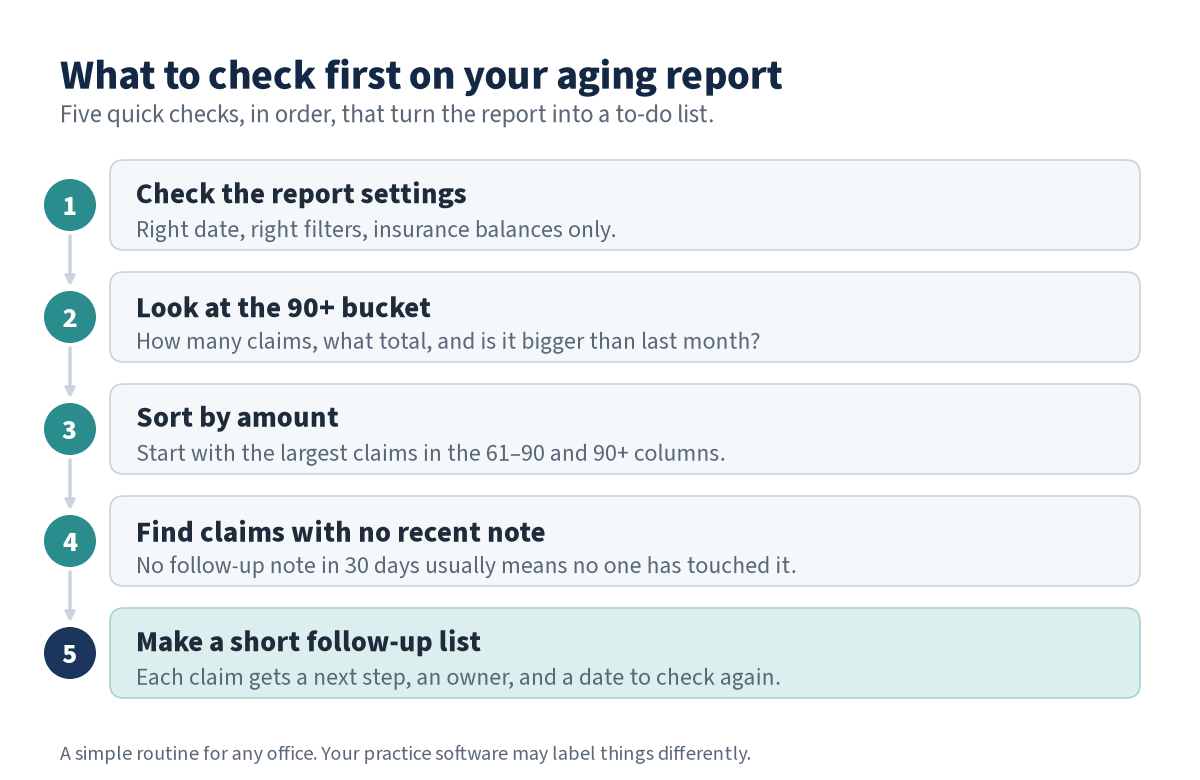
Five quick checks, in order, that turn your aging report into a follow-up list.
Red flags worth a closer look
Claims that still show as open after the plan paid. This usually means the EOB was never entered and posted to the patient's ledger. The report is wrong, not the plan.
Several open claims for the same patient and the same plan. This can point to an eligibility or coordination of benefits problem.
Denied claims with no appeal or corrected claim sent. A denial isn't the end, but the plan's appeal deadline starts counting down.
Claims the plan says it never received. Send these again quickly, with proof of the original send date if the plan asks for it.
Payments that came in lower than expected. A short-paid or underpaid claim may not leave a big open balance, so it's easy to miss. Compare the EOB with what you expected the plan to pay.
How often to read your aging report
A quick scan every week catches claims before they slide from 31–60 into 61–90. A fuller review once a month lets you compare the buckets over time and see whether things are getting better or worse. The report doesn't collect anything on its own. What matters is that every older claim has a next step and someone working it.
When it's time to get help
If the older columns keep growing, nobody has time to call the insurance plans, or no one's sure which claims are still worth working, it may be time to bring in help. Our team at SoRa handles dental insurance billing. That includes entering and posting EOBs, working denials, and following up on short-paid and underpaid claims. We charge one flat monthly fee, never a percentage of your collections.
FAQ
What does a healthy dental aging report look like? There's no single number that fits every practice. In a healthy report, most of the insurance balance usually sits in the 0–30 column, and the 90+ column stays small and isn't growing month to month. Most important, every older claim has a recent note and a clear next step.
How often should our office run an insurance aging report? A quick look every week and a fuller review once a month works well for many offices. The weekly look catches claims before they get old, and the monthly review shows whether each column is growing or shrinking.
Can we still collect on dental claims over 90 days old? Often, yes, but it depends on the plan's filing and appeal deadlines and on why the claim stalled. Check each one with the plan before you write it off, and work the oldest and largest claims first.
Why does our aging report show claims that insurance already paid? Usually the EOB or payment wasn't entered and posted to the patient's ledger, so the claim still looks open. Posting EOBs promptly keeps your aging report accurate.
What does SoRa's Free Aging Check look at? It's a free first look at your unpaid, still-pending insurance claims, so you can see where claims are stuck and what's worth working first.
Not sure what's sitting in your aging?
Start with a Free Aging Check for a first look at your unpaid, still-pending insurance claims. You can also call us at 201-564-0439 or book a time to talk.